

Best External SSD Hard Drives for Fast and Reliable Storage Products online india
Explore our real-time updated product directory index curated for performance, verified star metrics, and historical consumer trust rankings.


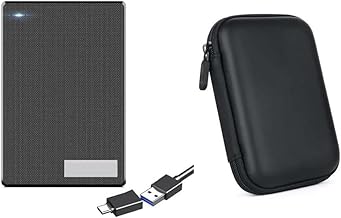


External SSD hard drives provide a convenient way to add portable storage to your digital setup. Unlike internal storage, an external drive can be connected when needed and carried between compatible devices. This makes it useful for students, professionals, photographers, content creators, gamers and home users who regularly manage large amounts of data. When shopping in India, it is important to consider storage capacity, connection type, transfer performance, portability and compatibility before choosing a drive.
An external SSD uses solid-state storage, which has no conventional spinning platters. This design allows SSDs to remain compact and makes them suitable for portable use. They can be useful for moving large folders, maintaining backup copies and keeping frequently used files accessible. Their small form factor also makes them easier to carry in a laptop bag, backpack or work case.
Storage capacity is one of the first factors to consider. Smaller-capacity external SSDs can work well for documents, office files, study materials and everyday backups. Higher-capacity options are more suitable when you need to store extensive photo libraries, high-resolution videos, creative projects or large collections of files. Consider both your current requirements and your expected storage needs before making a purchase.
A portable external SSD can be useful when you frequently move between home, college, office or different work locations. Its compact design can help reduce the space required in your bag while providing additional storage when your computer's internal drive becomes limited. It can also provide a convenient location for keeping a second copy of important files.
Connection compatibility matters because external drives rely on the available port and supported interface of the host device. Before buying, check whether your laptop, desktop, tablet or other compatible device supports the connector supplied with the drive. USB-C and other USB connections are common in modern computing devices, but supported transfer standards can vary between products and devices. Using a compatible connection helps you get the performance your setup can support.
External storage can extend the useful capacity of both laptops and desktop computers. It can be used for personal files, work documents, media collections and backups without requiring the computer to be opened for an internal storage upgrade. For users who regularly switch between devices, portability can also be an important advantage.
Keeping important files in more than one location can help reduce the impact of accidental deletion, device problems or other data-loss situations. An external SSD can serve as one destination for backup copies of important documents, photographs and project files. For better protection, keep backup drives disconnected when they are not being used and consider maintaining another backup in a separate location or compatible cloud service.
Transfer performance becomes particularly relevant when moving large files. Users working with videos, photographs, software projects or other sizeable folders may benefit from a drive and connection standard that supports faster data transfer. Actual speeds depend on the SSD, interface, host device, cables and workload, so published maximum speeds should be viewed as specifications rather than guaranteed everyday performance.
Portability is a major reason to choose an external SSD. A compact drive can be easier to transport than larger storage hardware, making it suitable for mobile work and study. If you expect to carry the drive frequently, consider its physical construction, dimensions and weight. Safe handling is still important because portable storage can be damaged by drops, moisture, extreme temperatures or poorly protected transport.
Different users can have different reasons for buying external storage. Students can use it for assignments, presentations and study resources. Professionals can keep work documents and project files readily available. Creators may use portable storage for photographs, video footage and editing assets. Home users can store family photographs, personal documents and entertainment files. Selecting capacity and connectivity according to the intended workload can make the drive more useful over time.
Explore external SSD hard drives to find portable storage suited to your digital requirements. By comparing capacity, compatibility, connectivity and performance, shoppers in India can select an external storage solution that fits their laptops, desktops and everyday file-management needs.
Find practical external SSD hard drives for expanding storage, backing up important files and carrying your data wherever you go. External solid-state drives offer a compact storage solution for laptops, desktops and other compatible devices. Whether you need extra space for documents, photos, videos, projects or large media files, choosing the right external storage can make everyday digital tasks more convenient.